
 in

The official Feasly plugin for ChatGPT
Feasly.
Now in ChatGPT.
Your workspace and calculation engine, connected. Ask a question, explore a change and keep the work in Feasly.
Live in ChatGPTConnect your Feasly account
Start with your saved model.
Marina Office opens with its existing assumptions and calculated results.
Recorded workflow · Fictional, unleveraged example before tax · Waits shortened
View the workspace at full sizeStart with your model
Open a saved Feasly project in ChatGPT, create a development or investment case, or bring a supported model file. Your assumptions and scenarios stay connected to your Feasly workspace.
Ask the question that matters
Understand what drives the result. Change a construction assumption or an acquisition input. The Feasly Calculation Engine calculates the case, so the conversation connects to the financial model.
Keep the work moving
Save the alternative as a separate scenario and open it in Feasly. Your team can review the result without rebuilding the case from a chat transcript.
Inside the real workspace.
The conversation and the financial model, side by side.
Feasly in ChatGPTCreate · Calculate · Save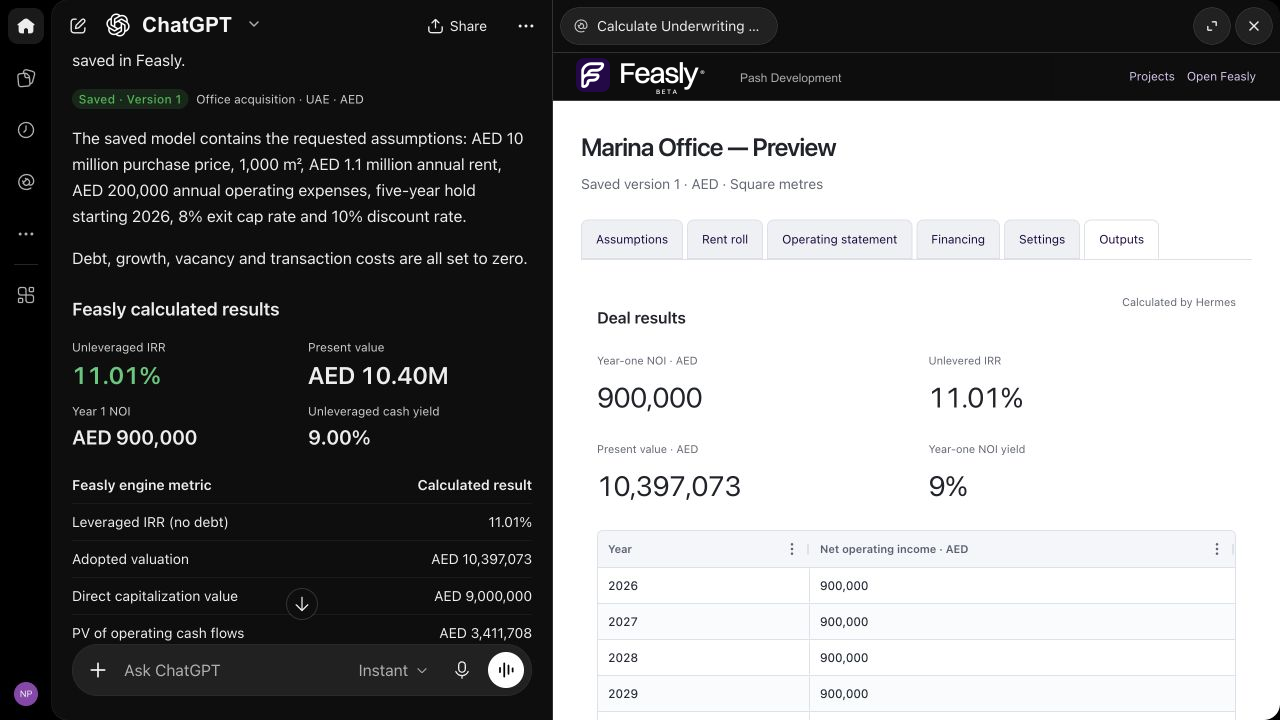
Inspect the ChatGPT workspace
Scroll across to inspect the original capture.
The work behind the question
Develop a scheme.
Underwrite an investment.
Bring the question to the model you need. Explore a new opportunity or continue an appraisal already underway.
Does the scheme still work?
Review land, construction, timing and funding assumptions. Compare the financial effect of a different case.
Explore development Investment underwritingWhat changes the investment case?
Work through purchase, income, debt and exit assumptions, and keep an alternative for comparison.
Explore underwritingYou ask the question.
Feasly runs the model.
Your saved model is the starting point. You choose the assumptions, authorise changes and review the result. ChatGPT uses Feasly’s tools to carry out your request; the Feasly Calculation Engine calculates the financial result.
Those calculations follow defined financial rules, with results you can repeat and review. Save the alternative, reopen it and inspect the assumptions behind the result.
Start from a saved case or a supported EstateMaster development or ARGUS Enterprise underwriting file. Compatibility depends on the model; arbitrary Excel conversion and native ARGUS Developer import are not included.
Explore file compatibilityLive in ChatGPT
Bring a real question.
See how the work connects.
Install the Feasly plugin from the ChatGPT directory. A Feasly sign-in and enabled workspace access are required to open and save projects. Availability depends on your ChatGPT plan, region and workspace settings.
Install the plugin, connect your Feasly account, then ask to open a saved model. Need workspace access or help with a supported file? Talk to our team. Maps and market research remain in the Feasly application.
ChatGPT, OpenAI and the OpenAI logo are trademarks of OpenAI. Feasly is an independent product.