IRR, NPV and profit
Compare development returns with the cash flow, timing and capital required clearly defined.
5 min read Feasly®Request access
 Reporting & review
Follow the changes, review the work with your team and prepare outputs tied to a saved model. Keep the basis of the decision clear as the project moves on.
Explore Feasly with your project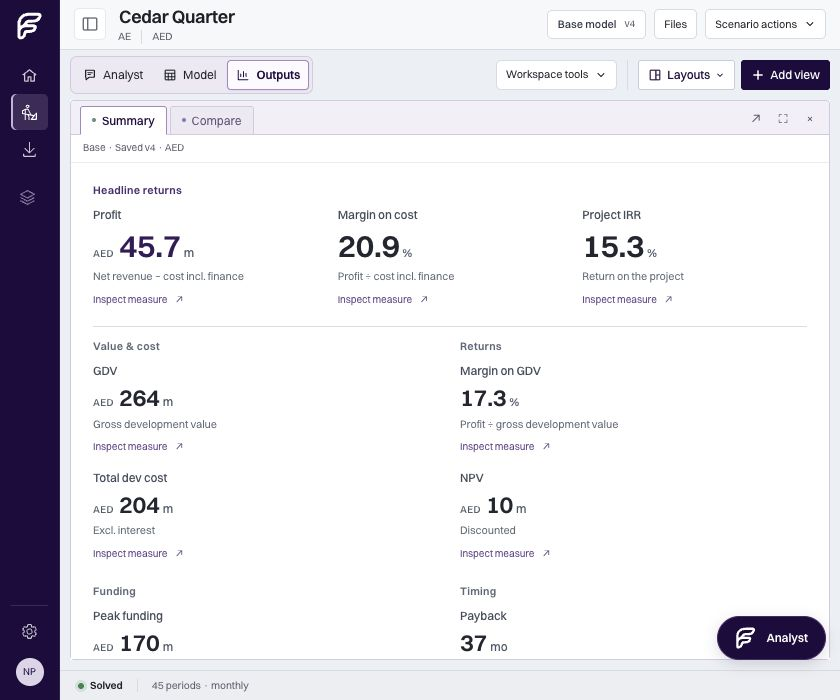
Use recorded versions to follow how the assumptions and appraisal developed. Review the changes, revisit an earlier point and use Undo and Redo as you work through revisions.
Bring teammates into shared projects with authoring and viewing roles. See who is present and bring their latest changes into view, so the review starts from the work you intend to discuss.
Add your recommendation and firm details to a PDF report, or export the model and results to an Excel workbook. The output identifies the saved model state used for that decision, giving the reader a fixed reference even when later work changes the appraisal.
Keep the evidence and alternatives together as work develops.
Calculation engineUnderstand the calculation behind the reported outcome.
From the library
Compare development returns with the cash flow, timing and capital required clearly defined.
5 min read
Build a US-style development forecast that connects uses, funding, receipts and the final outcome.
5 min read
Separate the commercial case, planning viability and valuation before comparing their assumptions.
5 min read