Real estate feasibility
Connect the proposal, evidence and cash flow to the decision you need to make.
5 min read Feasly®Request access
 Workspace
Keep assumptions, source documents, scenarios and results together. Put the information you need side by side, compare alternatives and carry the reasoning into review.
Explore Feasly with your project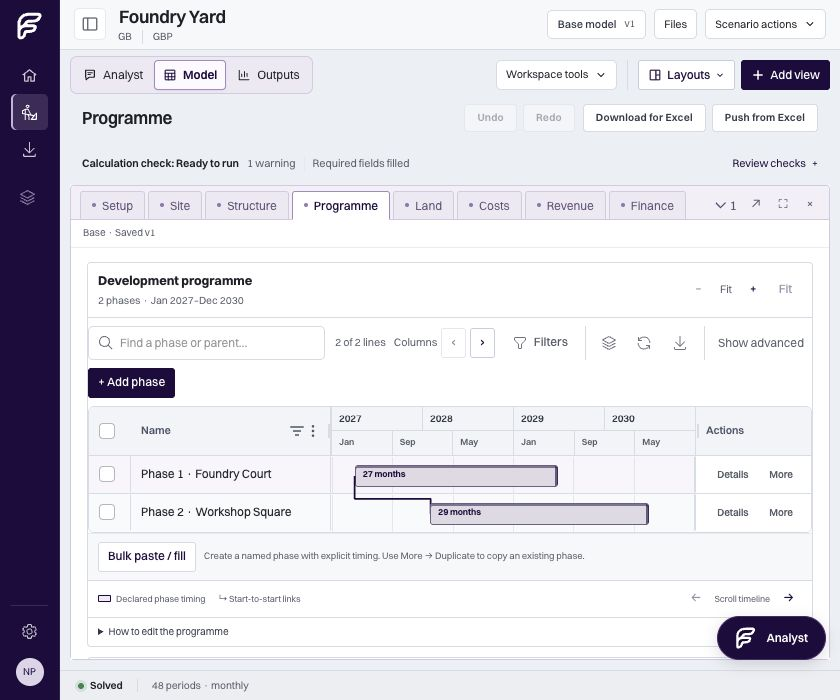
Group or split worksheets, keep cashflow and summary views beside the model, and open model and results views in separate windows. Save a named layout in your browser. Explore plot and building proposals within the same project.
Explore plots and massingBase is your main model and comparison baseline. Create a separate what-if, change its assumptions and compare the outcome. Return to Base when you need to, while your main appraisal continues to develop.
Read source documents alongside the Analyst and your model. Select the revision relevant to your question, so the conversation keeps the source context you chose as new documents arrive.
Follow recorded versions and changes to see how the appraisal developed. Use Undo and Redo as you work through revisions, and return to an earlier point when you need to revisit a decision.
Bring teammates into shared projects with authoring and viewing roles. Prepare reports from a saved model state, giving the review a clear point of reference while work continues.
Explore reporting and reviewWork through the physical proposal and its model connections.
Reporting & reviewTurn the appraisal into a report with a clear point of reference.
From the library
Connect the proposal, evidence and cash flow to the decision you need to make.
5 min read
See how payment timing changes the funding gap, even when total profit stays the same.
5 min read
Build a US-style development forecast that connects uses, funding, receipts and the final outcome.
5 min read